
Introduction:
In MS Office Solutions for Businesses & Students section, this post “School Exam Result & DMC Preparation Using MS Excel and MS Word” display a real, practical plain in which I prepared a complete school examination result and individual student DMCs (Detailed Marks Certificates)through Microsoft Excel and Microsoft Word.
To make this guide more functional and clear, sample documents and previews are included within this post so visitors can see the real format and workflow used.
Complete Exam Result Prepared in MS Excel
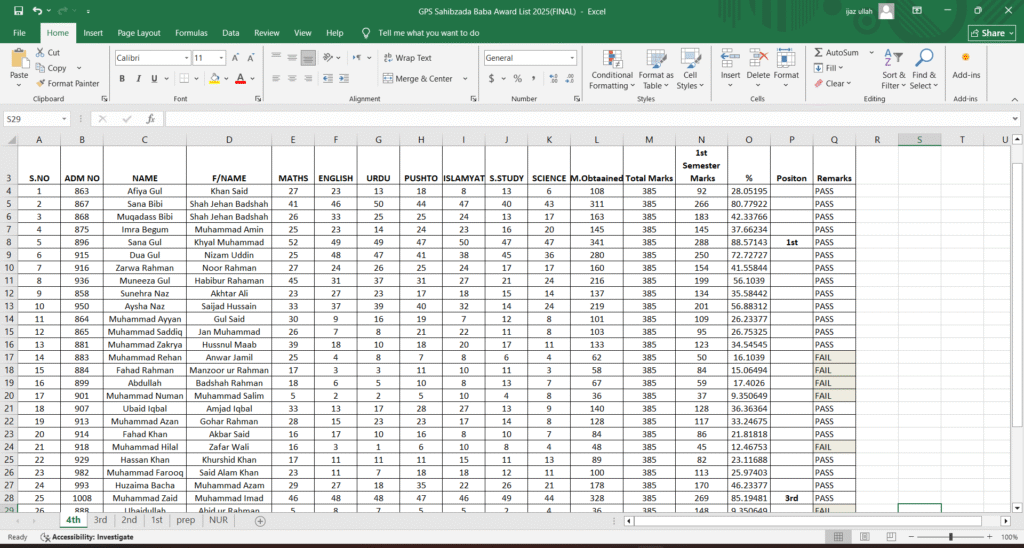
The first step involve in the School Exam Result & DMC Preparation in Microsoft Excel. The Excel sheet was structured to handle student data accurately and proficiently.
What the Excel Result Sheet Includes
- Student Name and Roll Number (Ali,200301)
- Class / Section (8th,B)
- Subject-wise Marks (Maths, English, Science etc)
- Automatic Total Marks (By using Excel formulas)
- Percentage Calculation (By using Excel formulas)
- Grade and Remarks (A, Passed/Fail)
Excel formulas were applied to ensure immediate calculations and to eliminate manual mistakes.
Individual Student DMC Template Designed in MS Word
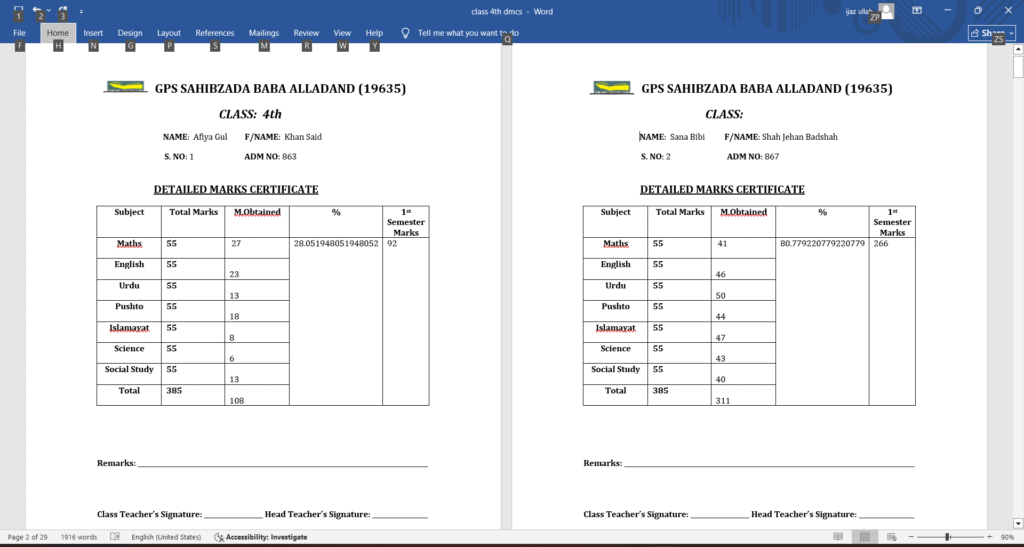
As I completed the School Exam Result & DMC Preparation, a professional and good looking DMC template was generated in Microsoft Word. The template was designed and structured once and can reused for all students.
Features of the DMC Template
- School name and examination title (GPS Sahibzada Baba Malakand
- Student identification details (Name, Father Name, S.No, Adm No. etc)
- Subject-wise marks table (By using MS Word table)
- Total marks, percentage, grade, and remarks
- Space for signatures and verification (Teacher sig, Headteacher sig etc)
The design conform clarity, readability, and a formal academic look.
How Individual DMCs Were Created in Just a Few Minutes
I generated Individual DMCs smoothly by using the prepared Excel result sheet and the Word DMC template.
Workflow Overview
- Excel data (Whole class result) was used as the main source
- Student-specific data was inserted into the MS Word template
- Each student received an individual, correctly formatted DMC
- No repetitive typing or manual calculations needed.
This method permits fast generation of multiple DMCs with compatible formatting.
Benefits of This Method
- Saves time and human efforts
- Minimize calculation errors
- generate professional-looking results
- Easy to update or correct any sort of data
- Suitable for schools, academies, and exam cells
This approach is particularly useful for institutions that do not use expensive ERP or any other result management software’s.
Conclusion
This post present a real-world use of MS Excel and MS Word in academic result management. With the right structure and process, even complex tasks like exam results and DMC preparation can be completed rapidly and accurately.